FAQ – for new students!
InSIS (Study Information System)
A video guide on setting up and using your school account (Moodle)
A video guide on setting up and using your school account is available in Moodle.
Multi-factor authentication (MFA) is required to access both InSIS and Microsoft 365. Before you can sign in, you must install a dedicated authentication app on your mobile phone, which will be used to securely verify your identity when accessing university systems.
More information about MFA can be found here.
Next, visit the InSIS portal.
Use the login credentials you received from the FIS Study Office after your enrolment in the programme. For security reasons, please change your password after your first login.
Once logged in, check your personal information carefully, especially your:
- full name,
- passport number,
- phone number, and
- contact address in the Czech Republic.
If any of this information needs to be updated, please contact the FIS Master’s Office or the EDS Office, or submit an official request through InSIS (e-Agenda → Contact Centre).
For additional information, please visit the website of the VŠE Informatics Centre.
- Your university email account can be accessed through InSIS or Outlook in Microsoft 365.
- If you do not plan to use Outlook regularly, we recommend setting up email forwarding from your university email account to your personal email address. This will help ensure that you do not miss any important messages.
- Your university email account is the official channel of communication with lecturers, university staff, and administrative offices. Important information from the university will be sent only to your university email address, so please check your inbox regularly.
- Your university email address has the following format: username@vse.cz
- For more information, please visit the website of the VŠE Informatics Centre.
In InSIS, you can:
- view your timetable,
- check your grades and study progress,
- access your study plan,
- find contact information for your lecturers,
- register for courses and examinations,
- submit assignments, projects, and your Bachelor’s or Master’s thesis,
- submit official requests and communicate with university administration.
Please note that official requests can only be submitted through InSIS.
You can also install the My College mobile application on your smartphone for easier access to selected InSIS functions. A guide to installing and using the application is available here.
For more information, please visit the website of the VŠE Informatics Centre.
- Guidebooks are published at the Sharepoint English Students FIS.
- You can also check the website of the VŠE Informatics Centre
Dormitories
- Rooms are allocated by the Central Accommodation Office; applicants cannot choose a room themselves. Please note that students are accommodated in shared twin rooms.
-
Students who submitted their dormitory application on time will be able to check their accommodation allocation in ISKAM under Accommodation – Accommodation requests (waiting lists) by August 3, 2026.
- Moving in is possible from 10th September, 2026.
- Move-in is possible only on weekdays during office hours. If your arrival is outside office hours, you must contact the Dormitory Manager in advance – Dormitories
- If you arrive in Prague earlier, you can stay at the hotel accommodation located at our dormitories.
- If you know that you will arrive later than September 10, 2026, please inform the Dormitory Manager of the dormitory where you will be staying – Dormitories.
- ⚠️ Please note that if you do not arrive within 5 days from the start of your accommodation, your reservation will be cancelled and the deposit will not be refunded.
If you know that you will arrive later, you must inform either the Dormitory Manager or the Central Accommodation Office in advance. If we receive this information and the dormitory fee is paid, your reservation will remain valid.
The contract can be found in your ISKAM account.
It is necessary to sign the contract electronically in the ISKAM interface. It is, of course, possible to study and go through the contract before signing. The contract can be signed in ISKAM 7 days before the beginning of student accommodation in ISKAM, when the possibility of electronic signature will be activated.
General accommodation terms and conditions can be found here.
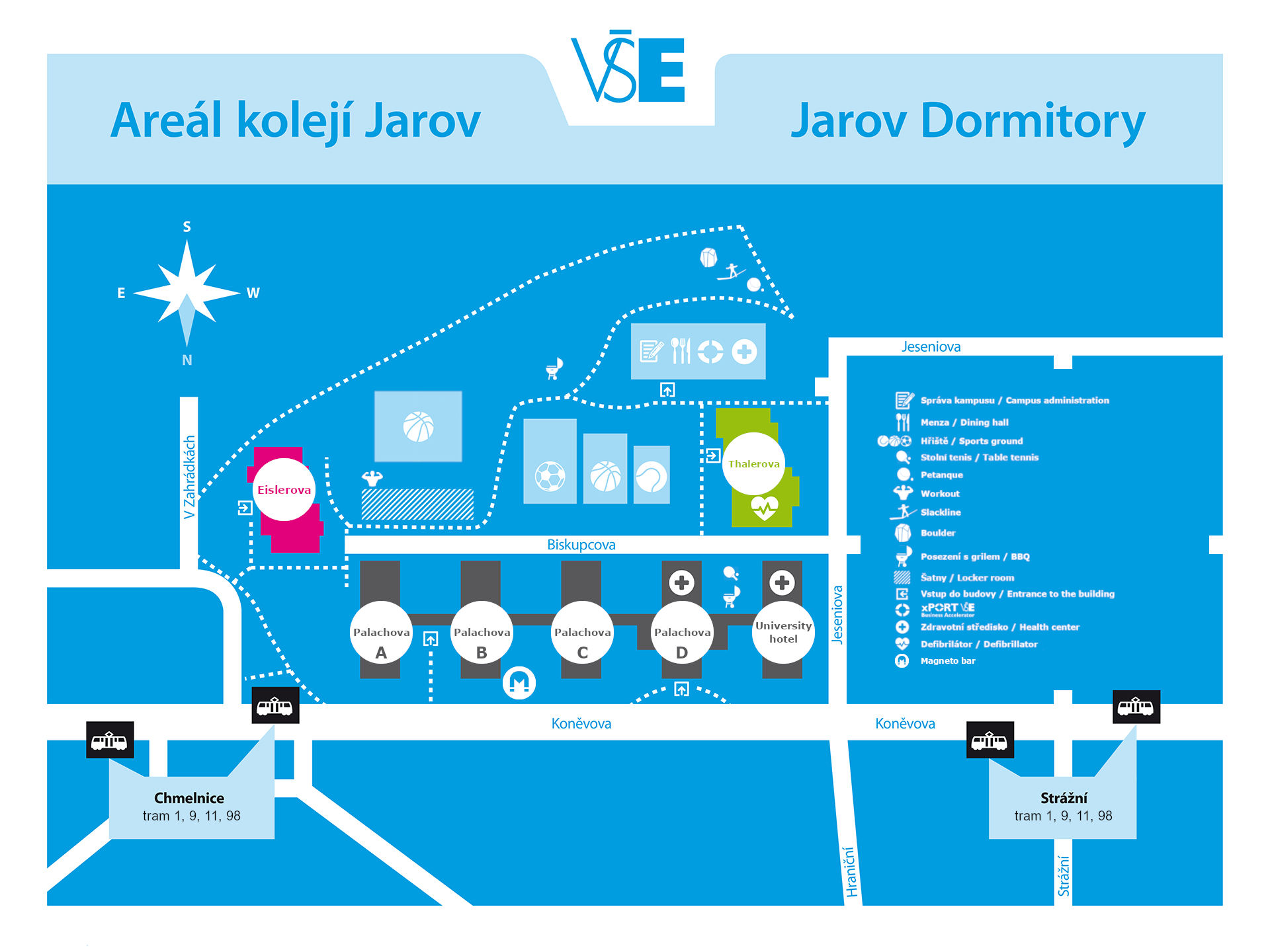
Jarov dormitories:
Palachova dormitory, University hotel, Dormitory Jarov II, Eislerova dormitory, Thalerova dormitory
The Jarov Campus is located in Prague 3, on Hartigova Street (formerly Koněvova Street). The dormitories are situated between the Strážní and Chmelnice tram stops. Dormitory Jarov II is about a 7-minute walk from the main Jarov campus dormitories and is located near the Kněžská luka and Spojovací tram stops.
Dormitory Vltava and Blanice are in Prague Jižní Město
There is a Volha bus stop nearby. The Chodov metro station (red line C) is three bus stops from the Volha stop.
Rooseveltova dormitory is in Prague Holešovice
There is a Výstaviště tram stop nearby. The Nádraží Holešovice metro station (red line C) and railway station Holešovice are one tram stop away from the Výstaviště stop.
WiFi
- The university campus and student residences use eduroam Wi‑Fi.
- Instructions on how to connect to eduroam can be found here. Please remember to set up a separate eduroam password before connecting.
- Student residences also provide wired internet access. You can connect your computer directly to the network socket in your room using an Ethernet cable.
- A wired connection offers several advantages over eduroam, most notably a more stable connection and higher internet speeds.
- Read the Handbook for 1-year students
- or visit the helpdesk at the Campus, Old Bulding, room number SB 22, opening hours are here.
- For more information, please visit the website of the VŠE Informatics Centre.
University ID Card
The University ID Card is required to access the dormitories, university buildings, selected classrooms, and the University Library.
It can also be used as an electronic wallet for payments in university canteens and at campus printers.
If you choose to obtain an ISIC card (International Student Identity Card), you will also be entitled to student discounts at many other locations outside VŠE, including shops, restaurants, theatres, and other service providers.
- ISIC card – 440 CZK
- usual Student ID card – 290 CZK
Students who have received an information email about the issue of the card can pick it up at the issue counter located next to the RB 101 auditorium in the passage from the Italská building to the Rajská building.
Opening hours from September 14, 2026 to October 25, 2026
- Monday: 9:00–12:00; 12:30–15:00
- Tuesday: 9:00–12:00; 12:30–15:00
- Thursday: 9:00–12:00; 12:30–15:00

Office 365
Microsoft 365 is a collection of cloud-based applications and services provided by Microsoft to support communication, collaboration, and productivity.
The most commonly used applications include:
- Outlook – email and personal information management
- Calendar – scheduling and managing appointments and events
- OneDrive – cloud storage for your files and documents (more information)
- SharePoint – a platform for sharing documents and collaborating on projects
- Microsoft Teams – a communication and collaboration tool for online classes, meetings, chats, and file sharing
- Forms – a tool for creating surveys, quizzes, and questionnaires
In addition, Microsoft 365 offers many other applications and services that you may use during your studies.
- Wait one day after your enrollment, as the system needs up to 24 hours to create your Office 365 account
- Before accessing Office 365, change your automatically generated InSIS password.
- Multi-factor authentication (MFA) is required to access both InSIS and Office 365.
- To use MFA, install the required authentication application on your mobile phone.
- For detailed instructions, please see the relevant information page.
- Sign in to Office 365 using your InSIS username in the format username@vse.cz and your InSIS password. Alternatively, you can install the Microsoft Teams application on your device, which is recommended.
- Go to Outlook on the web.
- In the Office 365 portal, select the Outlook application to access your university email account.
We use Microsoft Teams in many of our classes. Students who participate in hybrid teaching during the first three weeks of the semester will join classes through Microsoft Teams.
Microsoft Teams is a cloud-based communication and collaboration platform that enables students and staff to communicate, share materials, and participate in online classes. It is an excellent tool for online learning.
In addition, Teams provides various communication options for interacting with teachers and classmates. You can use text chat, audio calls, and video calls for both academic and administrative purposes.
Important:
- Your Office 365 account will be activated one day after your enrollment, as the system needs up to 24 hours to create the account.
- Before accessing Office 365, please change your automatically generated InSIS password.
1. Set up Multi-Factor Authentication (MFA)
Multi-factor authentication is required to access both InSIS and Office 365.
To use MFA, you must first install the required authentication application on your mobile phone. This application provides an additional layer of security when accessing university systems.
For detailed instructions, please see the relevant information page.
2. Sign in to Office 365
Open Google Chrome or Microsoft Edge and go to the Office 365 portal at www.office.com.
Sign in using:
- Your InSIS username in the format username@vse.cz
- Your InSIS password
Alternatively, you can install the Microsoft Teams application on your computer or mobile device, which is the recommended option.
3. Open Microsoft Teams
After signing in to Office 365, select the Teams application.
4. Switch to the Organizational View
We recommend switching from the School view to the Organization (Firm) view.
To do this:
- Click the Settings icon.
- Select Settings.
- Choose List view (recommended for organizations) instead of Grid view (used for schools).
5. Join Your Course Team
Locate the Team for your course.
If your instructor has provided a Team code, enter the seven-character code to join the course Team.
6. Join an Online Class
Online teaching takes place through Meetings in Microsoft Teams.
To access the online classroom:
- Click Hidden channels and select Show next to Online Learning.
- Open the Online Learning channel.
- Join the scheduled meeting by clicking Join.
Before entering the meeting:
- You may adjust your camera settings.
- If possible, keep your microphone muted when you are not speaking to avoid disturbing the class.
Additional Information
For further guidance and technical support, please visit the website of the VŠE Informatics Centre.
For more information, please visit the website of the VŠE Informatics Centre.
After arrival Visa obligations, Health insurance
EU CITIZENS
EU citizens accommodated outside the university dorms must report in person at the Foreign Police at the address below within 30 days of arrival. Those staying at the university dorms will be reported by the dorms office.
Foreign Police Office
Olšanská 2
130 51 Praha 3
More information can be found at the official webpage of the Czech government.
NON-EU CITIZENS
1. Non -EU citizens with long-term visa
- accommodated at the university dorms do not have to report to the Foreign Police. The dorms office will report them automatically.
- staying outside the dorms have to report to the Foreign Police at the address above within 3 working days of entering the Czech Republic.
2. Non-EU citizens with a long-stay visa issued for the purpose of collecting the long-term residence permit
Non-EU citizens applying for the long-term residence permit must within 30 calendar days of entering the Czech Republic register to the Ministry of Interior/Department for Asylum and Migration Policy for the purpose of carrying out activities associated with issuing a biometric residence card, where they may also report their arrival.
They then have to present themselves at the Ministry to collect the residence card within 60 days of biometric data collection.
For visiting the Ministry of Interior/Department for Asylum and Migration Policy it is necessary to have an appointment reserved in advance. Therefore, we recommend making an appointment with the Ministry of Interior office on this phone number +420 974 801 801 right after you arrive to the Czech Republic or at this webportal.
More information can be found at the official webpage of the Czech government.
If you applied for long-term visa or for long-term residence permit at an office of the Diplomatic Mission of the Czech Republic, you have to submit a certificate proving your travel medical insurance, before you can collect your long-term visa or your long-term visa for the purpose of residence permit, meeting the following criteria:
- Travel and medical insurance covering necessary and urgent medical care for the initial 90 days of your stay, and at the same time another agreement concluded with an insurance company authorised to provide comprehensive medical insurance in the Czech Republic.
- You may also submit a Certificate of Agreement with insurance company on a comprehensive medical insurance for the entire period of your stay.
Many companies offer such medical insurance, including PVZP, AXA, Uniqa, and others.
Look for more information on the health insurance here
Practical information for moving in to Czechia
JAROV DORMS
- TROL 59 (from the airport to Nádraží Veleslavín )
- Change to Metro A -from Nádraží Veleslavín to Flora Metro station
- Change to tram, use tram 11 (direction “Spojovací”) and go to tram stop Strážní
- To find the nearest connection, use the application idos
- Don’t forget to buy a ticket for 50 CZK and validate the ticket in the TROL bus
VLTAVA, BLANICE
- TROL 59 (from the airport to Nádraží Veleslavín )
- Change to Metro A -from Nádraží Veleslavín to Museum Metro station
- Change to Metro C – from Museum to the Chodov Metro station
- Take Bus 177 to the Volha stop
- Don’t forget to buy a ticket for 50 CZK and validate the ticket in the TROL bus
- Install the litacka application to your smart phone https://pidlitacka.cz/en
- And buy the long-term ticket. If you are younger than 26, connect with your ISIC card, to receive the student price.
- Information on prices are here. Student discount prices are available only for students under 26 years of age. You must provide proof of enrollment or an ISIC card, and always carry it with you when traveling in Prague.
About the Campus

Sharepoint English Students FIS – only active students with access to InSIS have access
Webinars for newly admitted students:

Webinar – Final information before your arrival in Prague (7 September, from 3PM CEST) – you can join the webinar here
Previous webinars:
Webinar – All you need to know about the start of your studies (19 August, from 3PM CEST ) – the record is available here
Webinar – All you need to know about moving to Prague (3 June, 2026, from 3PM CEST) – the record is available here
Webinar – All you need to know about VŠE dorms (23 April, 2026, from 3PM CEST) – the record is available here
Webinar – All you need to know about the Visa procedure (24 March, 2026) – the record is available here